Introduction
Firebase Realtime Database is a cloud-hosted NoSQL database that stores data as JSON and synchronizes it instantly across connected clients. It is designed for real-time applications like chat apps, dashboards, multiplayer games, and live tracking systems.
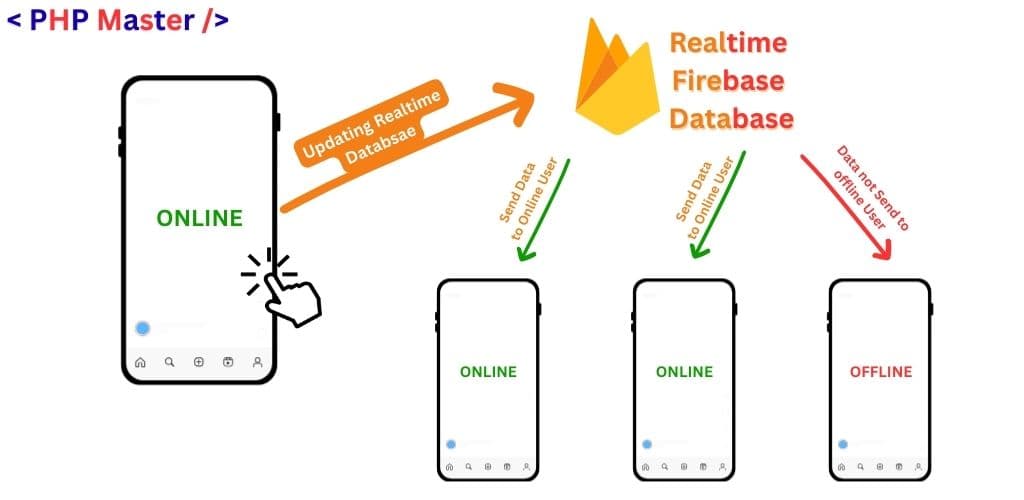
It maintains a persistent WebSocket connection. When data changes, updates are pushed automatically to all users. Offline support allows temporary local storage using IndexedDB.
Free Plan vs Blaze Plan
Firebase Realtime Database offers two pricing plans: Spark (free) and Blaze (pay-as-you-go). The Spark plan is ideal for development and small apps, while the Blaze plan scales based on usage.
| Feature | Spark Plan (Free) | Blaze Plan (Pay as You Go) |
|---|---|---|
| Simultaneous Connections | 100 connections | 200,000 per database |
| Database Size | 1 GB total storage | First 1 GB free, then $5 per GB |
| Data Download | 10 GB per month | First 10 GB free, then $1 per GB |
| Multiple Databases | ❌ Not available | ✅ Available |
| Best For | Learning, testing, small projects | Production apps & scalable systems |
Important Notes:
- When you upgrade to the Blaze plan, the Spark plan limits still apply first. You are only charged after exceeding the free tier limits.
- Blaze allows up to 200,000 simultaneous connections per database. You can create additional databases to further increase total concurrent connections.
- On Blaze, the first 1 GB storage and 10 GB download per month are free. Charges apply only after crossing these limits.
Read and Write Data
Reading and writing data in Firebase Realtime Database is straightforward using methods like set(), update(), push(), get(), and onValue().
Writing Data
Use set() to create new data and it will overwrite data if exists in same location, including any child nodes
import { ref, set, update } from "firebase/database";
set(ref(db, "users/u1"), {
  name: "John",
  age: 25
});
Use push() in Firebase Realtime Database to create new data with a unique key. The generated key is based on a timestamp combined with random data, which helps keep items ordered chronologically. These keys are created on the client side and are designed to avoid conflicts when multiple users add data at the same time.
import { ref, push, set } from "firebase/database";

const postListRef = ref(db, 'posts');
const newPostRef = push(postListRef);
const postId = newPostRef.key; // Get unique Key from ref Generated

set(newPostRef, {
  title: "My First Post",
  author: "User123",
  id: postId
});
Important Note: If you want to use a custom unique key instead of the auto-generated key from push(), you must use the set() method with your own defined path. This prevents Firebase Realtime Database from generating its automatic timestamp-based unique key.
Updating Data
Use update() to update sepcific fields data & use set() method above to update all fields data
import { ref, set, update } from "firebase/database";
update(ref(db, "users/u1"), {
  age: 26
});
Understanding the difference between set() and update() in Firebase Realtime Database is very important. The table below clearly shows how both methods behave in different scenarios.
| Scenario | update() | set() |
|---|---|---|
| Path exists with other data | Only changes age. Keeps name, bio, etc. | Deletes everything at u1 and leaves only age. |
| Path is empty | Creates path and sets age. | Creates path and sets age. |
| Targeting null | Passing { age: null } deletes only the age key. | Passing null deletes the entire u1 node. |
Atomic Updating Data
In Firebase Realtime Database, an atomic update() allows you to update multiple locations in the database at the same time using a single request. This means either all updates succeed together, or none of them are applied. If any part of the update fails, the entire operation is rolled back automatically.
import { ref, child, push, update } from "firebase/database";

// Get a key for a new Post.
const postData = {author: username, uid: uid, body: body, title: title};
const newPostKey = push(child(ref(db), 'posts')).key;

// create updates Objects with key[path] value[data]
const updates = {};
updates['/posts/' + newPostKey] = postData;
updates['/user-posts/' + uid + '/' + newPostKey] = postData;

// if failed, it will all failed  & if success it will all success
update(ref(db, "users/u1"), updates);
Reading Data
Use get() for one-time reads and its expensive if large data, do not root node use with limit pagination option
import { ref, onValue, get } from "firebase/database";
const snapshot = await get(ref(db, "users/u1"));
console.log(snapshot.val());
Use onValue() as Realtime Listener Runs once immediately, then every time data changes.
import { ref, onValue, get } from "firebase/database";
onValue(ref(db, "users/u1"), (snapshot) => {
  console.log(snapshot.val());
});
Use off() method to remove the Listener by passing reference database path
Use off() method to do not remove the Listener of child nodes For example If you have a listener on /users and another listener on /users/u1, by call the off(ref(db, '/users')) will not stop the listener on users/u1, you must pass the exact location whereas the listener started
import { ref, onValue, get } from "firebase/database";
onValue(ref(db, "users/u1"), (snapshot) => {
  console.log(snapshot.val());
});

// modern sdk v9+ :
// 1. Start the listener and save the "Unsubscribe" function
const unsubscribe = onValue(ref(db, 'users/u1'), (snapshot) => {
  console.log(snapshot.val());
});
// 2. When you want to stop (e.g., user leaves the page)
unsubscribe();
Use onValue with onlyOnce() if data not changed frequently, and reduce call from firebase database server it will get next time from cache
import { ref, onValue, get } from "firebase/database";
onValue(ref(db, "users/u1/username"), (snapshot) => {
  console.log(snapshot.val());
},  {
  onlyOnce: true
});
onlyOnce automatically remove the listener onValue() by calling with onlyOnce
Deleting Data
To delete data in Firebase Realtime Database, use the remove() method and you can use also use the update(), set() method to set the data null, it will delete the data & firebase never store the null word in database It allows you to delete a specific node, user record, or even an entire path from the database.
import { ref, remove } from "firebase/database";
const = ref(db, "users/u1")
remove(userRef);
When you use set() with null, you are essentially saying "Make this entire path empty" and remove it.
import { ref, set } from "firebase/database";
// This is 100% identical to calling remove(ref(db, 'users/u1'))
set(ref(db, 'users/u1'), null);
And You can use also Update() allows you to delete specific fields while keeping others, or even delete multiple different items at once.
import { ref, update } from "firebase/database";
const userRef = ref(db, 'users/u1');
update(userRef, {
  bio: null,      // This field is deleted
  website: null,  // This field is deleted
  lastActive: 1708862400 // This field is UPDATED or CREATED
});
You can even delete data in completely different parts of your databasea and delete data in a single "trip" to the server, if either failed or success at all
import { ref, update } from "firebase/database";
const userRef = ref(db, 'users/u1');
const updates = {};
updates['/users/u1/settings'] = null; // Delete u1's settings
updates['/posts/post123'] = null;     // Delete a specific post
updates['/logs/lastDelete'] = "User u1 deleted a post"; // Add a log

update(ref(db), updates);
Add a Completion Callback
if you want to know the data either success/commited or failed , then you can use completion callback, it will guranteed to you result
import { ref, set, update } from "firebase/database";
set(ref(db, "users/u1"), {
  name: "John",
  age: 25
})
.then(()=>{
  console.warn("write success")
})
.catch((error)=>{
  console.warn("write error", error)
});
Transaction in Firebase Realtime Database
In SQL databases, a transaction allows multiple operations to run together. If any operation fails, the entire process is rolled back.Firebase Realtime Database works a little differently.
If you want to update multiple locations safely at once, you can use Atomic Update. It behaves similarly to an SQL transaction because either all updates succeed or none of them are applied.
runTransaction() – Prevent Race Conditions
The runTransaction() method is used to prevent race conditions. A race condition happens when two users try to update the same data at the same time.
For example, if two people try to buy the last ticket at the same time, only one should succeed. Transactions ensure the data stays correct.
It is commonly used for counters, likes, stock quantity, or ticket systems.
import { ref, runTransaction } from "firebase/database";

const counterRef = ref(db, "posts/post1/likes");

runTransaction(counterRef, (currentValue) => {
  if (currentValue === null) {
    return 1;
  }
  return currentValue + 1;
});
Server-Side Atomic Increments
Firebase also provides server-side atomic increments. This allows you to safely increase or decrease a numeric value without manually handling race conditions.
import { ref, update, increment } from "firebase/database";

update(ref(db, "posts/post1"), {
  likes: increment(1)
});
This method is faster and cleaner when you only need to increment or decrement numeric values.
Realtime Listener Events
Firebase Realtime Database provides different listener events that help your application respond instantly when data changes. These events are useful when working with lists such as posts, messages, comments, or products.
Instead of listening to the entire database, you can listen to specific child events like when a new item is added, changed, removed, or reordered.
child_added
The child_added event triggers when a new child is added to a list. It also runs once for each existing child when the listener starts. This is commonly used in chat applications.
import { ref, onChildAdded } from "firebase/database";

const postsRef = ref(db, "posts");

onChildAdded(postsRef, (snapshot) => {
  console.log("New post added:", snapshot.val());
});
child_changed
The child_changed event triggers when an existing child node is updated. This is useful when updating likes, comments, or user status.
import { ref, onChildChanged } from "firebase/database";

const postsRef = ref(db, "posts");

onChildChanged(postsRef, (snapshot) => {
  console.log("Post updated:", snapshot.val());
});
child_removed
The child_removed event triggers when a child node is deleted from the database. This helps remove items from the UI instantly.
import { ref, onChildRemoved } from "firebase/database";

const postsRef = ref(db, "posts");

onChildRemoved(postsRef, (snapshot) => {
  console.log("Post deleted:", snapshot.val());
});
child_moved
The child_moved event triggers when the order of a child changes. This happens when you are using queries like orderByChild() and the position of data changes.
import { ref, onChildMoved } from "firebase/database";

const postsRef = ref(db, "posts");

onChildMoved(postsRef, (snapshot) => {
  console.log("Post moved:", snapshot.key);
});
These real-time listener events make Firebase Realtime Database powerful for building live applications such as chat apps, live feeds, dashboards, and notification systems.
Sorting and Filtering Data in Firebase Realtime Database
Firebase Realtime Database allows you to sort and filter data using query methods. This helps you read only the data you need, which improves performance and reduces bandwidth usage.
Sorting Data
Sorting is used when you want data in a specific order. Firebase provides three main sorting methods.
1. orderByChild()
Sort data based on a specific child property. This is commonly used for posts, timestamps, prices, or status fields.
import { ref, query, orderByChild } from "firebase/database";

const postsQuery = query(
  ref(db, "posts"),
  orderByChild("createdAt")
);
2. orderByKey()
Sort data based on the unique key.
import { ref, query, orderByKey } from "firebase/database";

const usersQuery = query(
  ref(db, "users"),
  orderByKey()
);
3. orderByValue()
Sort data based on the stored value. This is useful when storing simple key-value pairs.
import { ref, query, orderByValue } from "firebase/database";

const scoresQuery = query(
  ref(db, "scores"),
  orderByValue()
);
Filtering Data
Filtering helps you get specific results instead of the full dataset.
1. limitToFirst()
Get the first number of records.
import { ref, query, limitToFirst } from "firebase/database";

query(ref(db, "posts"), limitToFirst(5));
2. limitToLast()
Get the last number of records.
import { ref, query, limitToLast } from "firebase/database";

query(ref(db, "posts"), limitToLast(5));
3. equalTo()
Get records that exactly match a specific value.
import { ref, query, orderByChild, equalTo } from "firebase/database";

query(
  ref(db, "posts"),
  orderByChild("status"),
  equalTo("published")
);
4. startAt()
Get records starting from a specific value.
import { ref, query, orderByChild, startAt } from "firebase/database";

query(
  ref(db, "posts"),
  orderByChild("createdAt"),
  startAt(1700000000000)
);
5. endAt()
Get records ending at a specific value.
import { ref, query, orderByChild, endAt } from "firebase/database";

query(
  ref(db, "posts"),
  orderByChild("createdAt"),
  endAt(1700000000000)
);
6. startAfter()
Get records that come after a specific value. This is commonly used for pagination.
import { ref, query, orderByChild, startAfter } from "firebase/database";

query(
  ref(db, "posts"),
  orderByChild("createdAt"),
  startAfter(1700000000000)
);
7. endBefore()
Get records before a specific value.
import { ref, query, orderByChild, endBefore } from "firebase/database";

query(
  ref(db, "posts"),
  orderByChild("createdAt"),
  endBefore(1700000000000)
);
Cursor Pagination Example
Cursor pagination is better than page numbers in Firebase. Instead of using page 1, page 2, you use the last item value as a cursor.
Step 1: Get first 5 posts.
const firstPageQuery = query(
  ref(db, "posts"),
  orderByChild("createdAt"),
  limitToFirst(5)
);
Step 2: Save the last item's createdAt value.
Step 3: Get next 5 posts using startAfter().
const nextPageQuery = query(
  ref(db, "posts"),
  orderByChild("createdAt"),
  startAfter(lastCreatedAt),
  limitToFirst(5)
);
This method is efficient and scalable for large datasets.
Realtime Database Listener
Listeners allow applications to respond instantly when data changes. Always remove unused listeners to avoid memory leaks.
Firebase Realtime Database Security Rules
Firebase Security Rules protect your Firebase Realtime Database by controlling who can read and write data. Without proper rules, anyone could access or modify your database. Security Rules ensure that only authorized users can perform specific actions.
These rules run on the Firebase server and are automatically enforced for every read and write request.
1. Basic Authentication Rule
The simplest rule is to allow only authenticated users to read and write data.
{
  "rules": {
    ".read": "auth != null",
    ".write": "auth != null"
  }
}
This means only logged-in users can access the database.
2. User-Based Access Control
Often, users should only access their own data. You can restrict access using their unique user ID (uid).
{
  "rules": {
    "users": {
      "$uid": {
        ".read": "auth != null && auth.uid === $uid",
        ".write": "auth != null && auth.uid === $uid"
      }
    }
  }
}
This ensures users can only read and write their own data.
3. Role-Based Access Control
You can create roles like admin or editor and restrict access based on roles.
{
  "rules": {
    "posts": {
      ".write": "root.child('roles').child(auth.uid).val() === 'admin'"
    }
  }
}
In this example, only users with the admin role can modify posts.
4. Data Validation Rules
Security Rules can validate data before it is written to the database. This prevents invalid or malicious data from being stored.
{
  "rules": {
    "posts": {
      "$postId": {
        ".validate": "newData.hasChildren(['title', 'createdAt'])"
      }
    }
  }
}
This ensures that every post must contain both a title and createdAt field.
5. Field-Level Validation
{
  "rules": {
    "users": {
      "$uid": {
        "age": {
          ".validate": "newData.isNumber() && newData.val() >= 13"
        }
      }
    }
  }
}
This rule ensures age must be a number and at least 13.
6. Read-Only Data
You can make certain data publicly readable but not writable.
{
  "rules": {
    "publicPosts": {
      ".read": true,
      ".write": "auth != null"
    }
  }
}
7. Indexing for Better Query Performance
When you query using orderByChild(), you should define indexes in your Security Rules for better performance.
{
  "rules": {
    "posts": {
      ".indexOn": ["createdAt", "status"]
    }
  }
}
Without indexing, large queries may fail or become slow.
Best Practices for Firebase Security Rules
- Never leave your database fully open in production.
- Always require authentication for sensitive data.
- Restrict users to access only their own records.
- Use validation rules to prevent invalid data.
- Use indexing for frequently queried fields.
- Test rules using the Firebase Emulator before deploying.
Properly configured Firebase Security Rules are essential for building secure, scalable, and production-ready applications.
Client Connect and Disconnect Functionalities
Firebase Realtime Database provides built-in features to detect when a user connects or disconnects from your application. This is very useful for online status systems, chat apps, multiplayer games, and live dashboards.
Using special paths like .info/connected and the onDisconnect() method, you can manage user presence automatically in real time.
Client Connect - Online Status
Firebase Realtime Database provides a special path called.info/connected. It returns true when the client is connected to the Firebase server and false when the client is disconnected.
This feature is mainly used to mark a user as online when they successfully connect to the database.
import { ref, onValue } from "firebase/database";

const connectedRef = ref(db, ".info/connected");

onValue(connectedRef, (snapshot) => {
  if (snapshot.val() === true) {
    console.log("User is connected. Mark user as online.");
  }
});
This helps you detect real-time connection changes instantly and is commonly used in chat apps and live presence systems.
Client Disconnect - Offline Status
The onDisconnect() method allows you to register an action that will automatically run when the client disconnects from the Firebase server.
It is mainly used to mark a user as offline in the database. The important thing to understand is that onDisconnect() runs on the Firebase server, not on the client device.
This means even if the user closes the browser, loses internet, or the app crashes, the server will still execute the registered operation.
import { ref, onDisconnect, serverTimestamp } from "firebase/database";
const userStatusRef = ref(db, "status/u1");
onDisconnect(userStatusRef).set({
  state: "offline",
  lastChanged: serverTimestamp()
});
Because the operation runs on the Firebase server, it is reliable and safe for building real-time presence systems without needing a separate backend server.
Real Life Example
In real-time applications like chat apps, messaging systems, or multiplayer games, it is important to track whether a user is online or offline. Firebase Realtime Database provides a reliable way to manage user presence across multiple devices or browser tabs.
In this example, each device connection is stored separately insideusers/{uid}/connections. If at least one active connection exists, the user is considered online. If all connections are removed, the user is marked offline.
The .info/connected path detects when the client connects to the Firebase server. The onDisconnect() method registers actions that automatically run on the server when the user disconnects, even if the app closes or the internet connection is lost.
import { getDatabase,  ref,  onValue,  push,  onDisconnect,  set,  serverTimestamp } from "firebase/database";

import { getAuth } from "firebase/auth";

const db = getDatabase();
const auth = getAuth();

auth.onAuthStateChanged((user) => {
  if (!user) return;
  const uid = user.uid;

  // Path to store active connections
  const connectionsRef = ref(db, "users/" + uid + "/connections");

  // Path to store last seen timestamp
  const lastOnlineRef = ref(db, "users/" + uid + "/lastOnline");

  // Special Firebase path to detect connection state
  const connectedRef = ref(db, ".info/connected");

  onValue(connectedRef, (snapshot) => {
    if (snapshot.val() === true) {

      // Create a new connection for this device/tab
      const newConnectionRef = push(connectionsRef);

      // Mark this device as connected
      set(newConnectionRef, {
        connectedAt: serverTimestamp()
      });

      // When this device disconnects, remove only its connection
      onDisconnect(newConnectionRef).remove();

      // When ALL devices disconnect, update lastOnline
      onDisconnect(lastOnlineRef).set(serverTimestamp());
    }
  });
});
This approach ensures accurate real-time presence tracking and works safely when a user is logged in from multiple devices at the same time.
Realtime Database Limitation
Firebase Realtime Database has technical limits to keep the system stable and fast. If your application grows large, these limits become important. Below are the most important limits explained in simple words with examples.
1. Maximum Data Depth (32 Levels)
Your data structure cannot be deeper than 32 nested levels. Deep nesting also makes reads slower and increases bandwidth usage.
{
  "level1": {
    "level2": {
      "level3": {
        "... too deeply nested ..."
      }
    }
  }
}
Solution: Keep your data flat and avoid deep nesting.
2. Maximum String Size (10 MB)
A single string value cannot be larger than 10 MB. This usually happens when developers store images or large text as strings.
set(ref(db, "profile/u1"), {
  image: "very_long_base64_string_here..."
});
Solution: Store images or large files in Firebase Storage and save only the file URL in the database.
3. Maximum Read Size (256 MB)
A single read request cannot return more than 256 MB of data. Reading very large collections at once may fail or increase cost.
// Bad: reading entire large collection
get(ref(db, "allUsers"));
Better way: Use pagination.
import { query, limitToFirst } from "firebase/database";

query(
  ref(db, "allUsers"),
  limitToFirst(50)
);
4. Write Rate (~1,000 Writes Per Second)
A single database supports around 1,000 writes per second (soft limit). If you continuously exceed this, Firebase may slow down your writes.
// Bad: heavy writes to same location
for (let i = 0; i < 5000; i++) {
  set(ref(db, "counter"), i);
}
Solution: Distribute writes across different paths or use multiple database instances in the Blaze plan.
5. Maximum Write Size
When using the SDK, a single write request cannot exceed 16 MB. Using the REST API, the limit is 256 MB.
// Large object write
set(ref(db, "bigData"), veryLargeObject);
Solution: Split large data into smaller parts and avoid uploading huge JSON objects at once.
Realtime Database Limits Table Overview
| Category | Limit |
|---|---|
| Maximum Data Depth | 32 levels |
| Maximum Key Length | 768 bytes (cannot contain . $ # [ ] / or control characters) |
| Maximum String Size | 10 MB per string |
| Maximum Read Size | 256 MB per request |
| Maximum Nodes with Listener | 75 million nodes |
| Maximum Query Time | 15 minutes |
| Write Rate | About 1,000 writes per second (soft limit) |
| Maximum Write Size | 16 MB (SDK) / 256 MB (REST API) |
| Write Throughput | 64 MB per minute |
Quick Summary
- Keep your data structure simple and avoid deep nesting.
- Do not read very large paths at once.
- Keep each write under 16 MB when using the SDK.
- Avoid sending more than 1,000 writes per second continuously.
- Large-scale apps should distribute writes across multiple paths or databases.
Performance Best Practices
To build fast and scalable applications with Firebase Realtime Database, follow these performance best practices.
- Keep Data Flat: Avoid deeply nested JSON structures. Flat data improves read speed and reduces bandwidth usage.
- Read Only What You Need: Do not fetch large collections at once. Use queries like limitToFirst() or limitToLast() for pagination.
- Use Indexing: Define
.indexOnin security rules for fields you query often. This improves query performance. - Avoid Hotspots: Do not write repeatedly to the same node. Distribute writes across different paths to prevent bottlenecks.
- Remove Unused Listeners: Always detach listeners using off() when they are no longer needed to avoid memory leaks.
- Use runTransaction() for Counters: Prevent race conditions when multiple users update the same value.
- Use Server-Side increment(): For simple counters, use increment() instead of manually reading and updating values.
- Store Large Files in Firebase Storage: Do not store images or large files as strings in the database.
- Choose the Correct Region: Select a database region close to your main users to reduce latency.
- Scale with Multiple Databases (Blaze Plan):If your app grows large, use multiple database instances to increase write throughput and connections.
Conclusion
Firebase Realtime Database is a powerful real-time NoSQL database designed for applications that require instant data synchronization. It allows data to update automatically across all connected clients without managing a custom backend server.
With features like real-time listeners, atomic updates, transactions, multi-device presence tracking, and built-in offline support, it is ideal for chat applications, live dashboards, multiplayer games, and collaboration tools.
However, to build scalable applications, it is important to understand its limitations such as write rate, data structure design, indexing, and query restrictions. Following best practices like keeping data flat, using indexing, and managing connections properly ensures better performance and reliability.
When used correctly, Firebase Realtime Database provides a simple, fast, and scalable solution for building modern real-time web and mobile applications.