In this guide, we will learn how to use global state in Next.js using both React Context API and Zustand. React Context is the official way provided by React, while Zustand is a lightweight external library that can also work outside of React’s component lifecycle.
Why Do We Need Global State in Nextjs?
Before jumping into implementation, it’s important to understand why global state is needed.
Before Global State in Next.js (Prop Drilling Problem)
Consider a component structure where data is created in Component One, but needs to be accessed in Component Six.
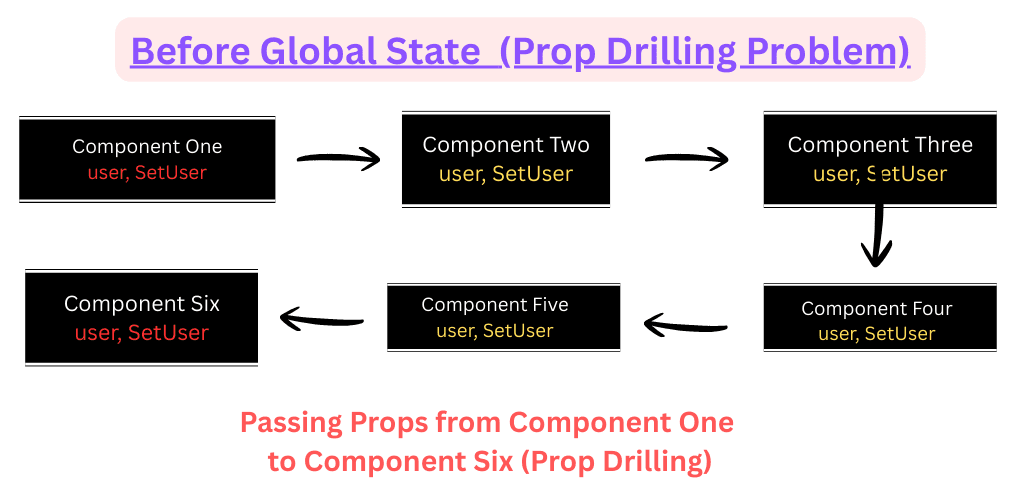
Without global state, we are forced to pass the same data through Component Two, Three, Four, and Five using props—even though those components do not actually need the data.
This problem is known as prop drilling. It leads to unnecessary coupling, poor maintainability, and makes refactoring difficult as the application grows.
After Global State
With global state, data is stored in a centralized place. Any component—whether it is Component Six or any other—can directly access and update the state without passing props through intermediate components.
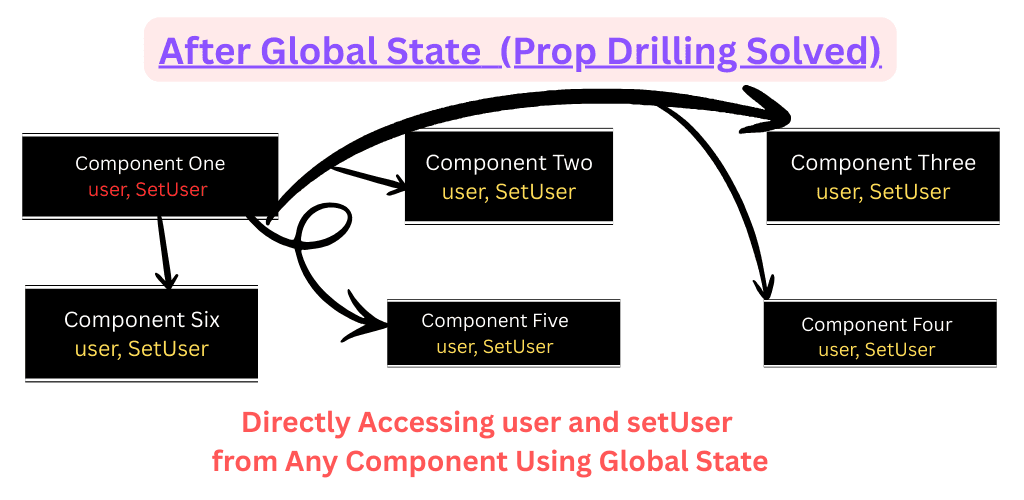
This results in cleaner code, better scalability, and easier maintenance.
Implementation of Global State in Nextjs
Let’s now understand how to implement global state in Next.js using React Context API and Zustand, along with persistent and non-persistent approaches.
Watch the Practical Implementation
Prefer learning by watching? Follow along with a complete step-by-step walkthrough of this Global State implementation in nextjs, including both temporary and persistent state examples.
Watch Video1. React Context API
React Context API is the official way to manage global state in React. It works well for authentication state, themes, and shared application data.
Create Context
"use client";

import { createContext, useContext, useState } from "react";

const AuthContext = createContext(null);

export function AuthProvider({ children }) {
  const [user, setUser] = useState(null);

  return (
    <AuthContext.Provider value={{ user, setUser }}>
      {children}
    </AuthContext.Provider>
  );
}

export function useAuth() {
  const context = useContext(AuthContext);
  if (!context) {
    throw new Error("useAuth must be used inside AuthProvider");
  }
  return context;
}
Wrap Context in Layout
// app/admin/layout.js
import { AuthProvider } from "@/context/AuthContext";

export default function AdminLayout({ children }) {
  return (
    <AuthProvider>
      {children}
    </AuthProvider>
  );
}
Using Context in Components
"use client";
import { useAuth } from "@/context/AuthContext";

export default function AdminPage() {
  const { user, setUser } = useAuth();

  return (
    <div>
      {user ? (
        <>
          <p>Welcome, {user.name}</p>
          <button onClick={() => setUser(null)}>Logout</button>
        </>
      ) : (
        <button onClick={() => setUser({ name: "Sajid Ali" })}>
          Login
        </button>
      )}
    </div>
  );
}
When setUser is called in one component, the updated state is automatically reflected across all components using the context.
However, one limitation exists: after a page refresh, the state is lost.
Adding Persistence with localStorage
To prevent data loss on page reload, we can persist the state usinglocalStorage.
"use client";

import { createContext, useContext, useState, useEffect } from "react";

const AuthContext = createContext(null);

export function AuthProvider({ children }) {
  const [user, setUser] = useState(null);

  useEffect(() => {
    const savedUser = localStorage.getItem("authUser");
    if (savedUser) {
      setUser(JSON.parse(savedUser));
    }
  }, []);

  useEffect(() => {
    if (user) {
      localStorage.setItem("authUser", JSON.stringify(user));
    } else {
      localStorage.removeItem("authUser");
    }
  }, [user]);

  return (
    <AuthContext.Provider value={{ user, setUser }}>
      {children}
    </AuthContext.Provider>
  );
}

export function useAuth() {
  return useContext(AuthContext);
}
- Important Notes -
- Never store sensitive data like tokens, passwords, or user private information in localStorage
- Prefer HttpOnly cookies for authentication tokens to prevent XSS attacks
- Use localStorage only for UI settings, themes, carts, or user preferences
2. Zustand
Zustand is a lightweight state management library and a popular alternative to Redux. It works outside React’s component tree and supports persistence using middleware.
Create Zustand in Nextjs Component
import { create } from "zustand";

export const useGlobalStateZustand = create(
  (set) => ({
    user: null,
    setUser: (user) => set({ user }),

  }),
);
Zustand allows accessing and mutating state without prop drilling and can even be used inside plain JavaScript classes.
Using Zustand in Nextjs
"use client";
import { useGlobalState } from "@/context/useGlobalState";
import { useRouter } from "next/navigation";

export default function Page() {
  const { user, setUser } = useGlobalState(); // and get user has data, after set
  const router = useRouter();
  const loginUser = ()=>{
    setUser({ name: "Sajid Ali", phone_no:7065221377} )
    router.push("/dashboard");
  }
  return (
    <div className="d-flex justify-content-center align-items-enter mt-4">
        <button className="btn btn-lg btn-primary" onClick={()=>{loginUser()}} >
          Login
        </button>
    </div>
  );
}
Using Zustand in Outside Nextjs Component or In Server Side Component
import { useGlobalStateZustand } from "@/lib/useGlobalStateZustand";
export class UserService {
    static setUser({name, phone_no}){
        const state = useGlobalStateZustand.getState();
        return state.setUser({name, phone_no})
    }
}
"use client";
import { UserService } from "@/service/UserService";
export default function (){
    const result = UserService.setUser({name:"PHPMaster", phone_no:"7065221377"});
    return "hello";
}
Zustand Persistence in Nextjs
import { create } from "zustand";
import { persist } from "zustand/middleware";
export const useGlobalStateZustand = create(
  persist((set) => ({
    user: null,
    setUser: (user) => set({ user }),
  }),
  {
    name:"userZustand"
  }
)
);
Zustand allows accessing and mutating state without prop drilling and can even be used inside plain JavaScript classes.
- Important Notes -
- Never store sensitive data like tokens, passwords, or user private information in localStorage
- Prefer HttpOnly cookies for authentication tokens to prevent XSS attacks
- Use localStorage only for UI settings, themes, carts, or user preferences
Conclusion
Both React Context API and Zustand are excellent choices for global state management in Next.js. Context is ideal for simple and official solutions, while Zustand shines in performance-critical and complex applications.
Understanding the when to use temporary state and when to persist data is key to building scalable, maintainable, and user-friendly applications.